Skip to content

Speech to text, built for the OPD

Talk to your patient. The case paper writes itself.

Healthcare-OPDesk records the consultation with the patient’s consent, turns the conversation into text with each speaker kept apart, and drafts the case paper from only what was said. The doctor checks it, adds findings by voice and signs.

  • Consent in the patient’s own language
  • The audio is never kept
  • Nothing is signed until the doctor checks it
Recording the consultationEnglish · Hindi · Marathi02:14
  • Doctor What brings you in today?
  • Patient Fever and cough for three days, and body ache.
  • Doctor Any breathlessness or chest pain?
  • Patient No, but the cough is worse at night.
Speech to text, then drafted
Case paper drafted

From only what was said — the doctor reviews before signing

Chief complaint
Fever and cough
Duration
3 days
History
Body ache; cough worse at night; no breathlessness or chest pain
Illustration of the Record & transcribe step
  • Speech to text
    The conversation becomes the case paper
  • Three specialties
    Dental, Pediatrics, General Physician
  • Live token queue
    Walk-ins, tokens and a waiting-room screen
  • Multi-clinic
    Each clinic keeps its own brand and data

Speech to text

From the conversation to a signed case paper

The doctor talks to the patient, not the screen. The consultation is recorded with consent and turned into text, Hindi, Marathi or English, with each speaker kept apart. The case paper is drafted from what was said, and nothing is signed until the doctor has checked it.

  1. 1

    Consent

    The patient agrees to the recording, with the text in their own language beside English.

  2. 2

    Record

    One tap starts the recording. The audio is turned into text and is never kept.

  3. 3

    Transcript

    The conversation comes back as text, with each speaker kept apart.

  4. 4

    Drafted case paper

    Complaints, history and duration are drafted from only what was said.

  5. 5

    Dictated findings

    The doctor adds the examination by voice, in English or Hindi.

  6. 6

    Diagnosis & prescription

    A diagnosis group fills the medicines; allergy and history conflicts are flagged.

  7. 7

    Review & sign

    The doctor signs; the case paper is locked and ready as a PDF.

  8. 8

    Invoice

    The visit’s treatments and fees become the invoice, and the next patient is called.

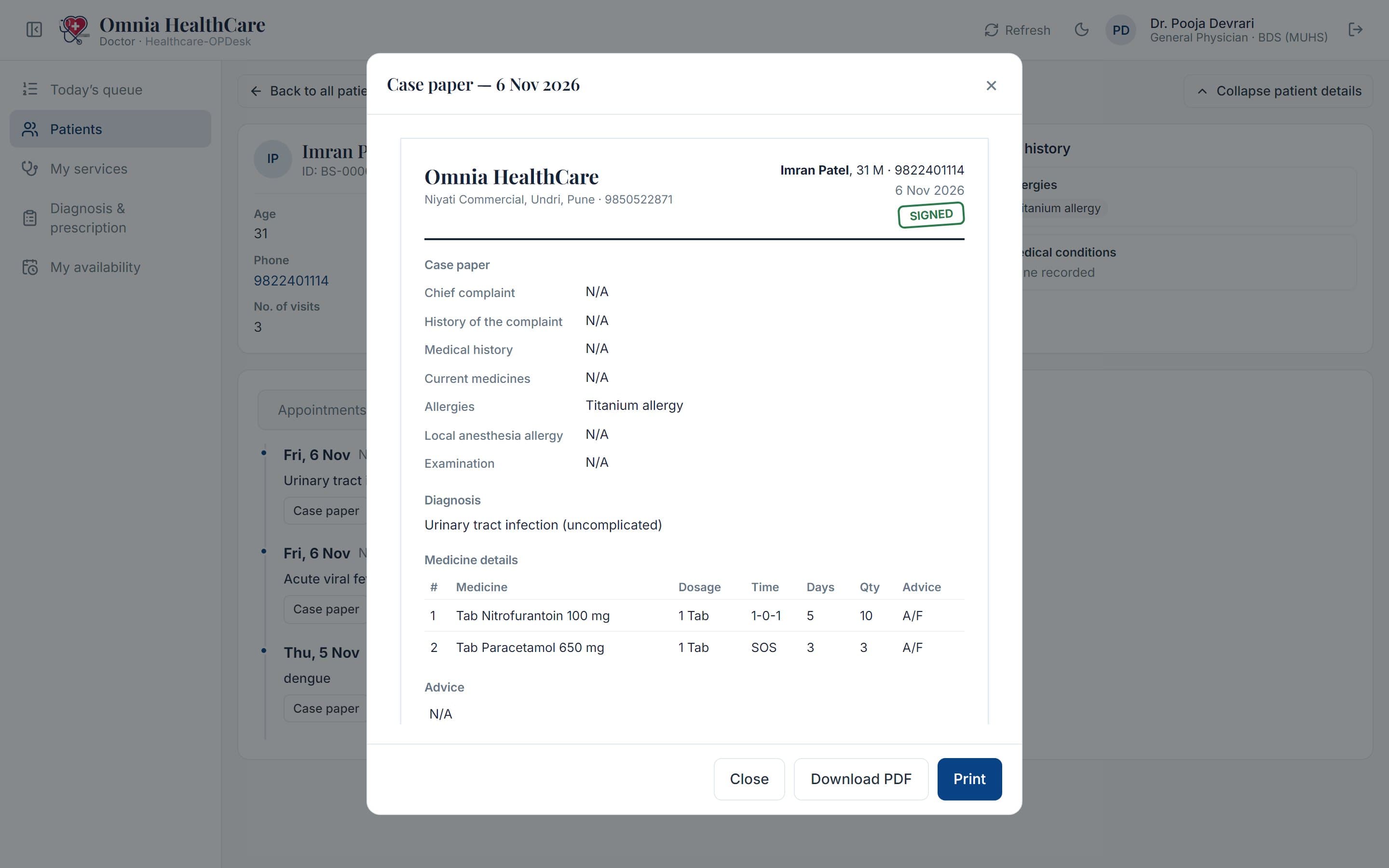
A signed case paper: the patient’s complaints, history, examination, diagnosis and prescription, with the doctor’s signature

About Healthcare-OPDesk

One place for the whole working day

Most clinics still run on a paper register, a billing app and the doctor’s memory. Healthcare-OPDesk replaces that patchwork with one platform built around how an Indian OPD works: the patient walks in, gets a token, sees the doctor, pays and goes home with a signed prescription.

Monkstack builds Healthcare-OPDesk for single-doctor clinics and multi-doctor practices. Each doctor works in their own specialty, with their own services, fees and diagnosis groups.

  • Front desk

    Walk-ins, tokens, appointments, payments and follow-ups from one counter.

  • Doctors

    Today’s queue, the patient’s history and a case paper drafted from the conversation.

  • Patients

    One file each: allergies, history, visits, treatments, vaccines and growth.

  • Clinic admin

    Branding, opening hours, team invites, doctors’ hours and leave.

Features

What Healthcare-OPDesk does, screen by screen

These are the real screens your front desk and doctors work in. Nothing here is a mock-up.

Front desk

Walk-ins, tokens and a live queue for every doctor

Add a walk-in and they get the next token in their doctor’s queue. The front desk sees who is waiting and who is with each doctor, all day.

  • A live queue for each doctor, and a waiting-room screen for the TV
  • Appointments by day, as a list or a calendar
  • Doctors’ weekly hours, leave and colours
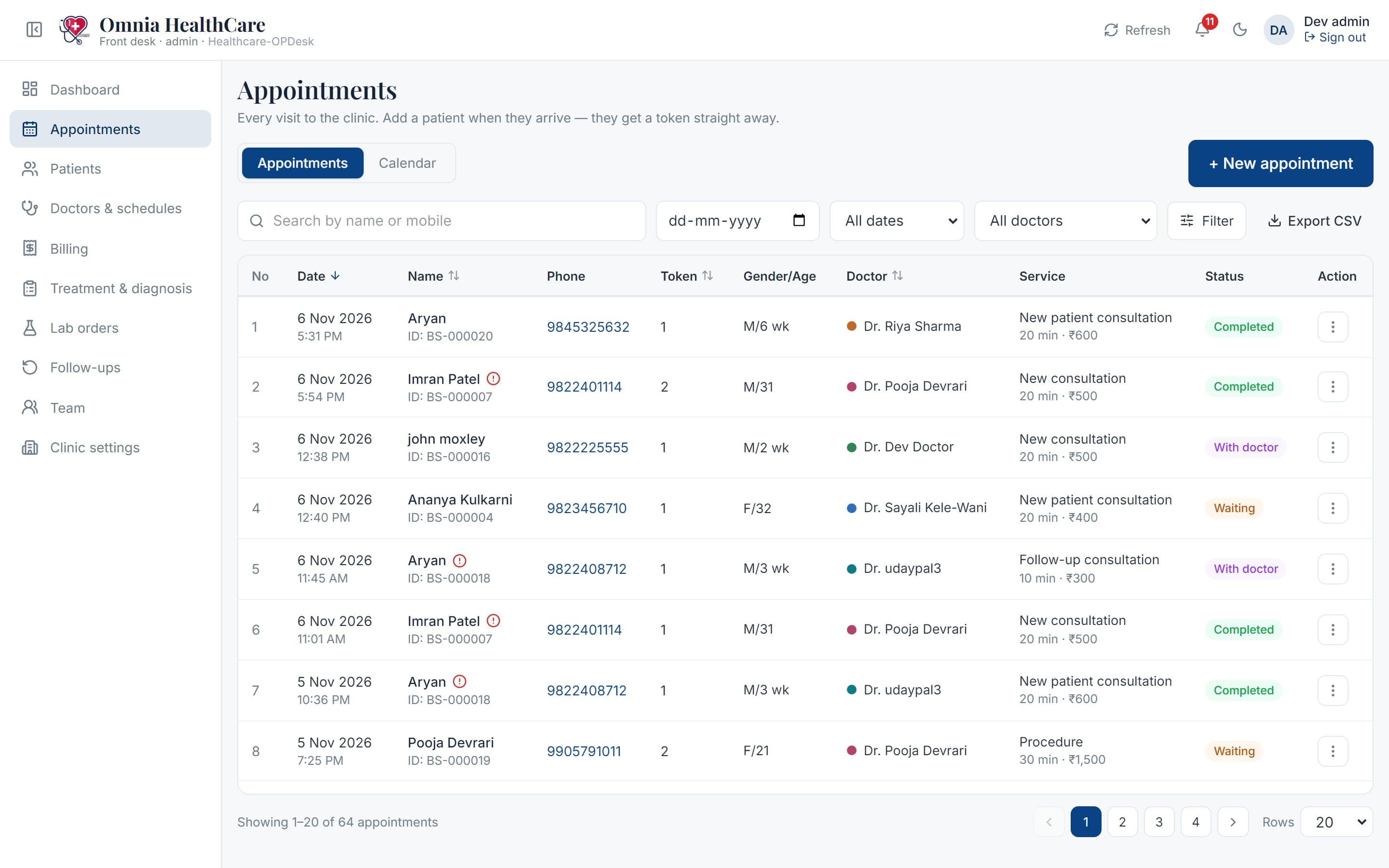
The appointments list: date, patient, token, doctor, service and status for each visit

Patient file

Everything about a patient, on one screen

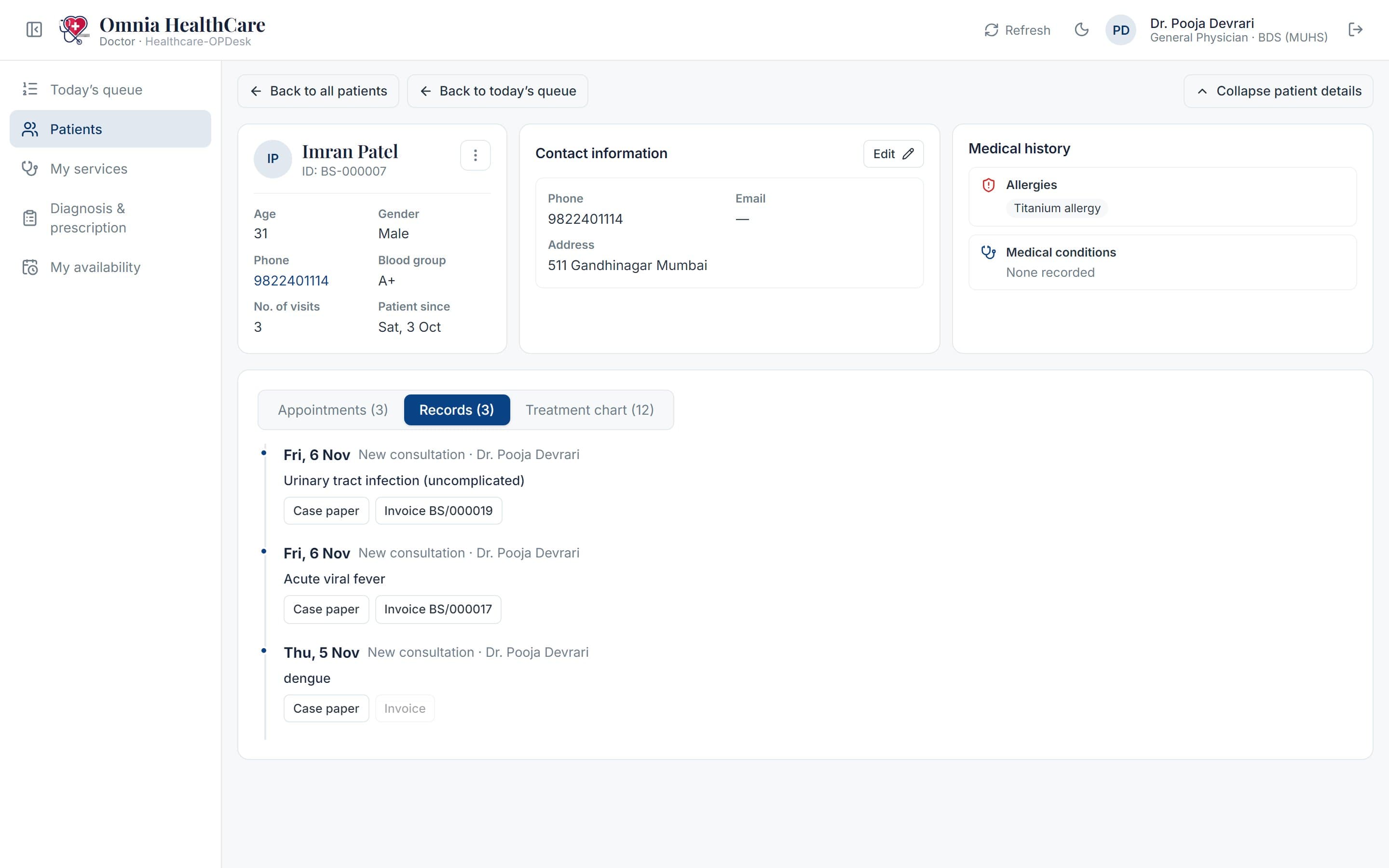
Allergies and medical conditions stay at the top of every visit. Past visits, records and treatments are a tab away.

  • Search by name, mobile or patient ID
  • A child’s parent or guardian, and siblings on the same number
  • Every signed visit, read back as it was signed
A patient’s file: details, allergies, and their signed visits with the case paper and invoice of each

Billing

The invoice builds itself from the visit

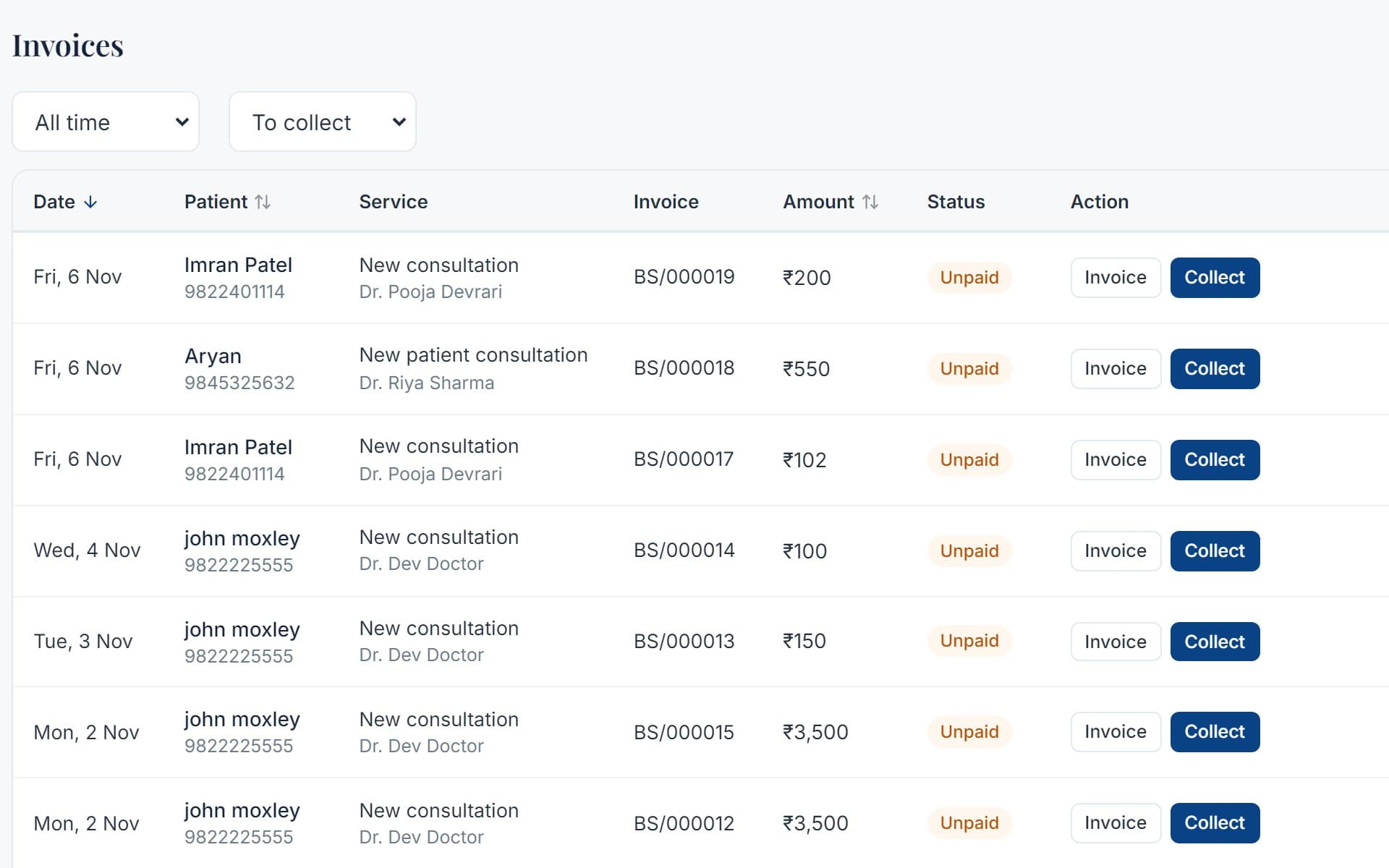
Treatments done and the doctor’s additional fees go on the invoice, with a discount if needed. Payments are taken in UPI, cash or card, in parts if the patient prefers.

  • Invoice numbers per clinic
  • What is still to collect, on the dashboard
  • A signed invoice to print or download
The billing page: the day’s invoices, what was paid and what is still to collect

Specialties

Built for the way each doctor works

A doctor picks their specialty once, at their first sign-in. Their screens, starter lists and documents follow it.

Dental

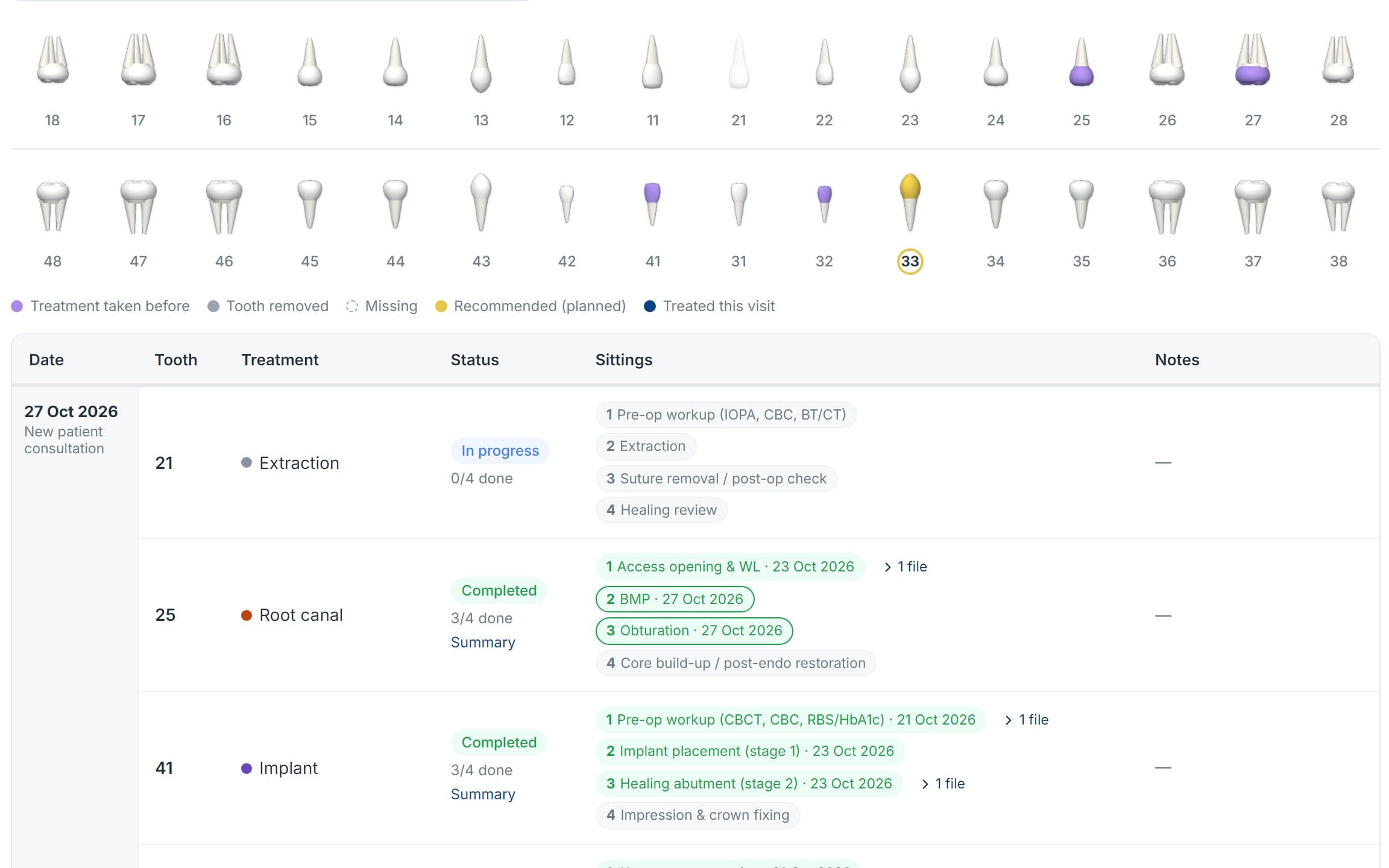
A tooth chart the dentist works on during the visit.

  • Tooth chart with surfaces, and a 3D jaw view
  • Treatments planned, in progress and done, sitting by sitting
  • X-rays and photos kept on the tooth
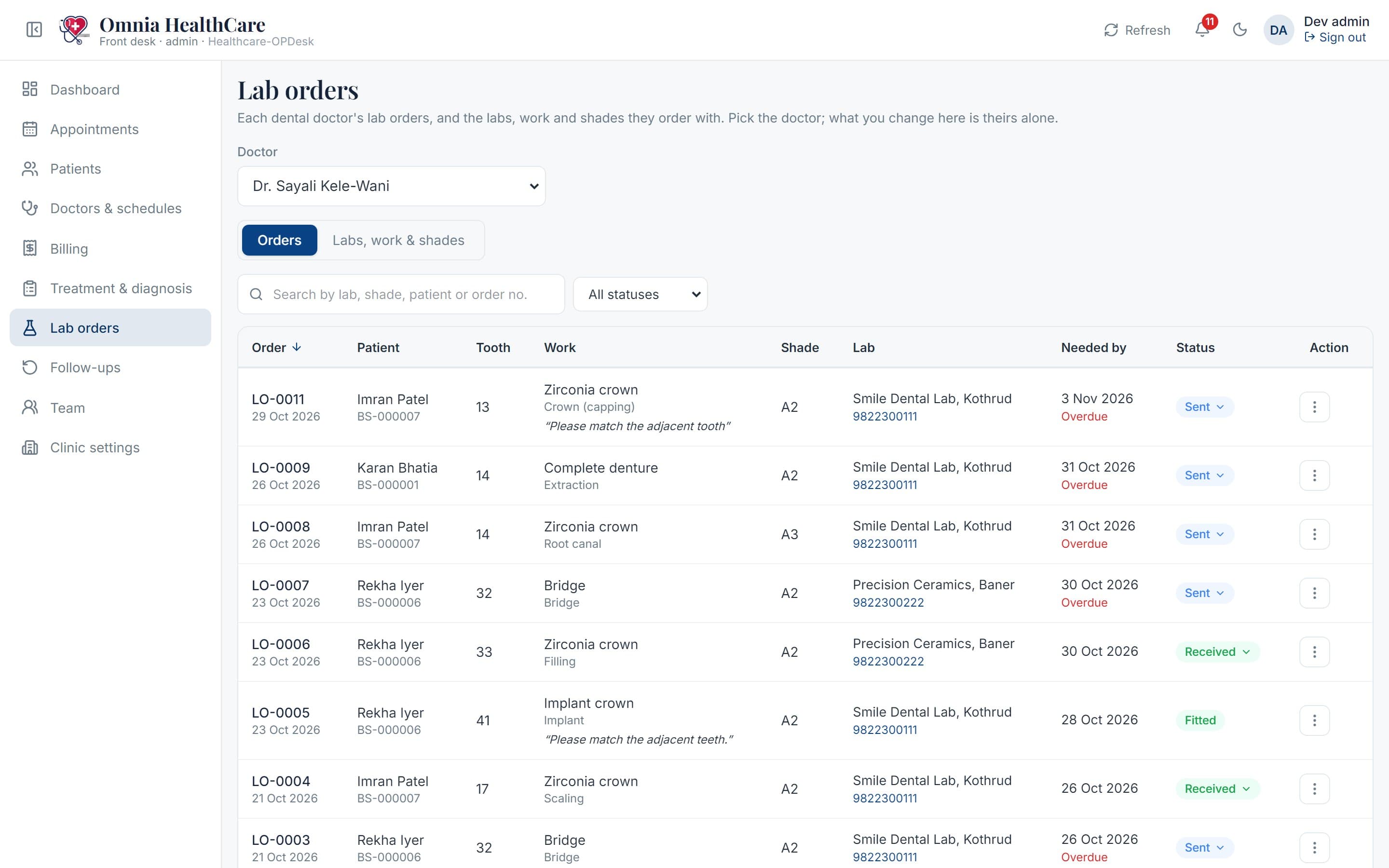
  • Lab orders to your dental labs, with work types and shades
  • A treatment summary PDF for the patient
The dental chart: every tooth drawn from its 3D model, coloured by the treatment it has had or needs
Lab orders: each order’s patient, tooth, work and shade, and where it is with the lab

Pediatrics

A child’s growth and vaccines, visit after visit.

  • Growth charts on WHO and IAP centiles
  • A vaccination chart by age, with doses due and overdue
  • The immunization card in the familiar paper layout
  • Vaccine orders and the brands you give
  • Medicines dosed by the child’s weight
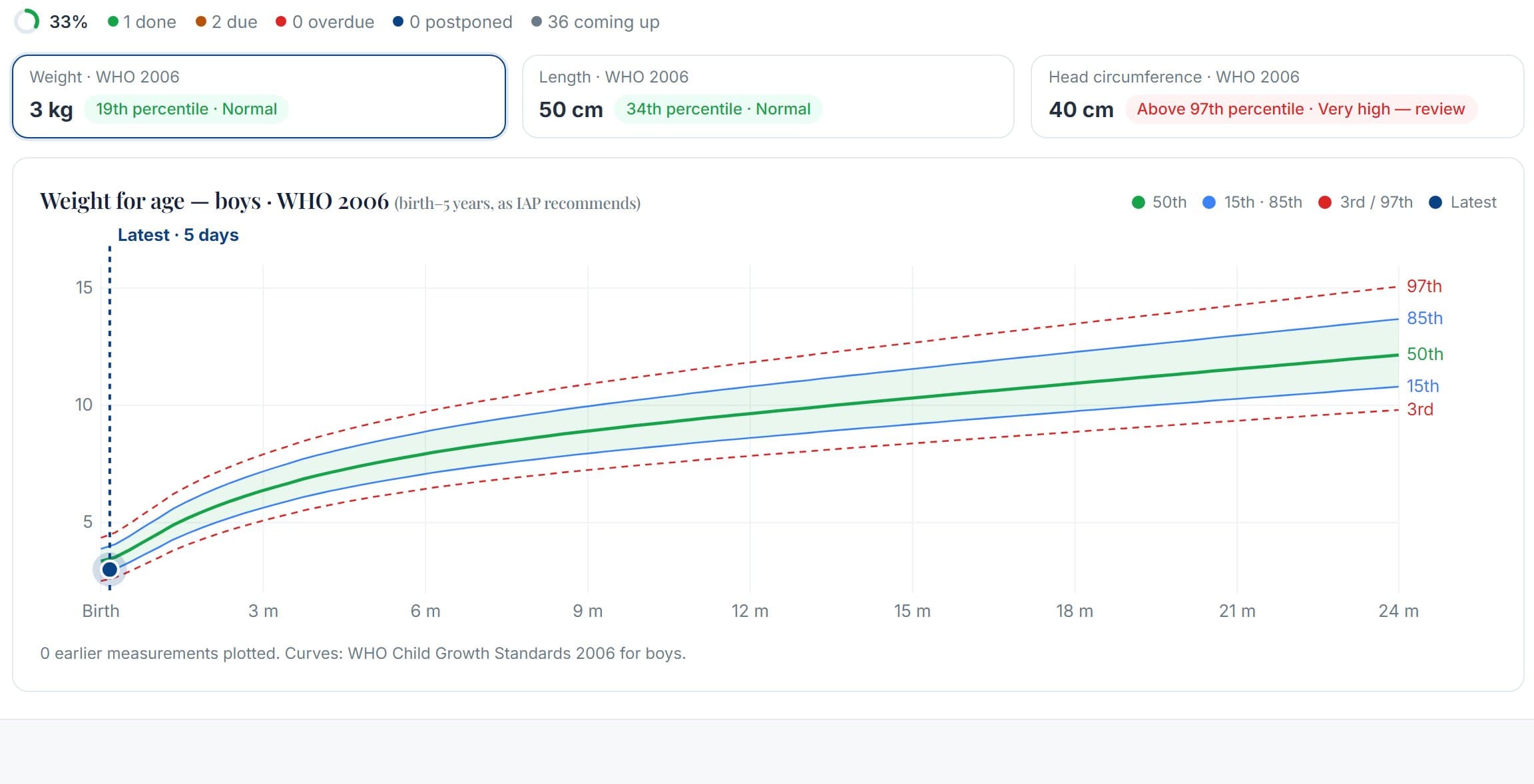
A child’s growth chart: weight plotted against WHO centile curves
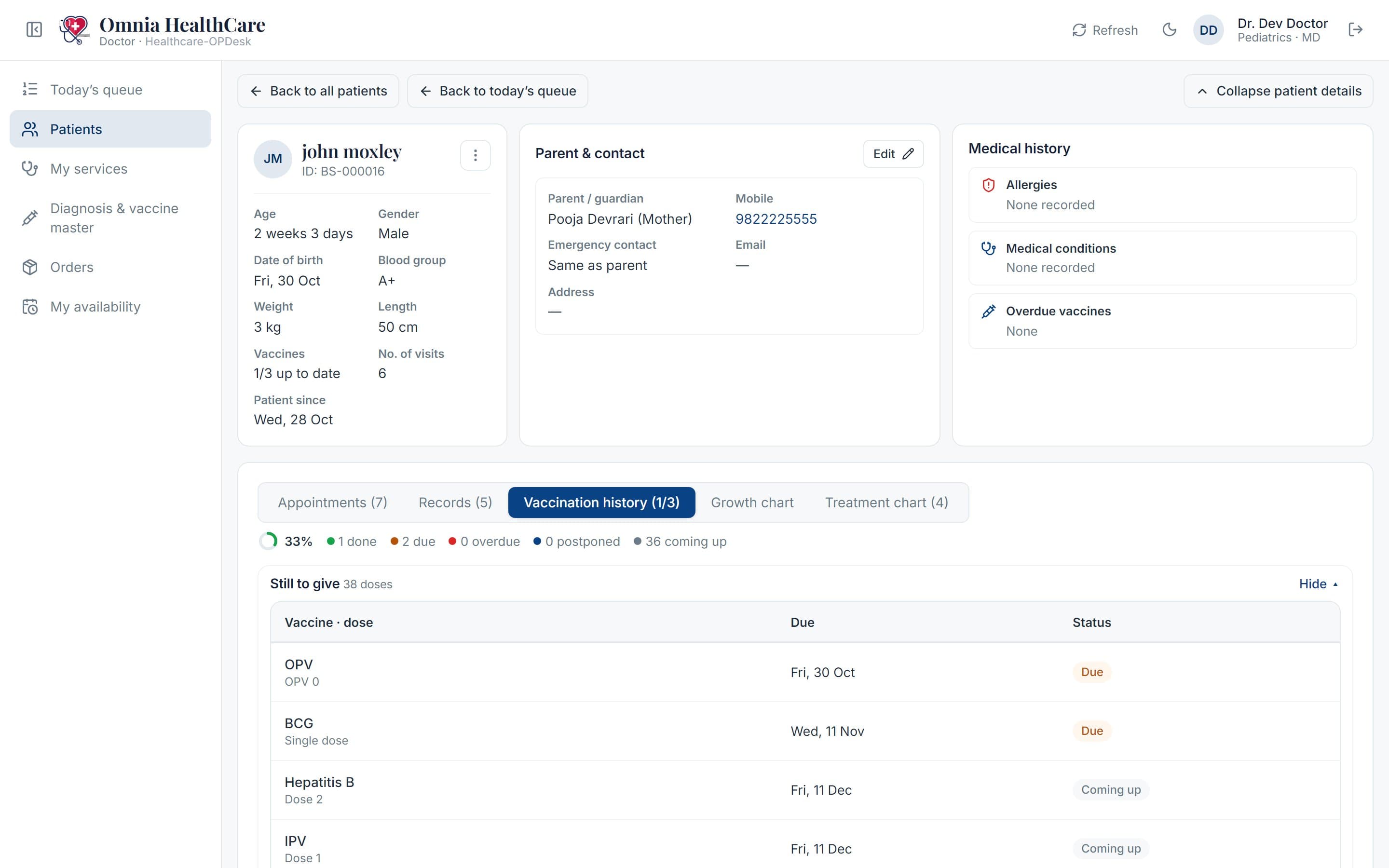
A child’s vaccination history: doses given, due and coming up, with the date each is due

General Physician

Fast, safe prescriptions for everyday OPD cases.

  • Diagnosis groups that fill the prescription in one click
  • Allergy and history conflicts flagged before signing
  • Your own additional fees on the invoice
  • Case paper and prescription as a signed PDF
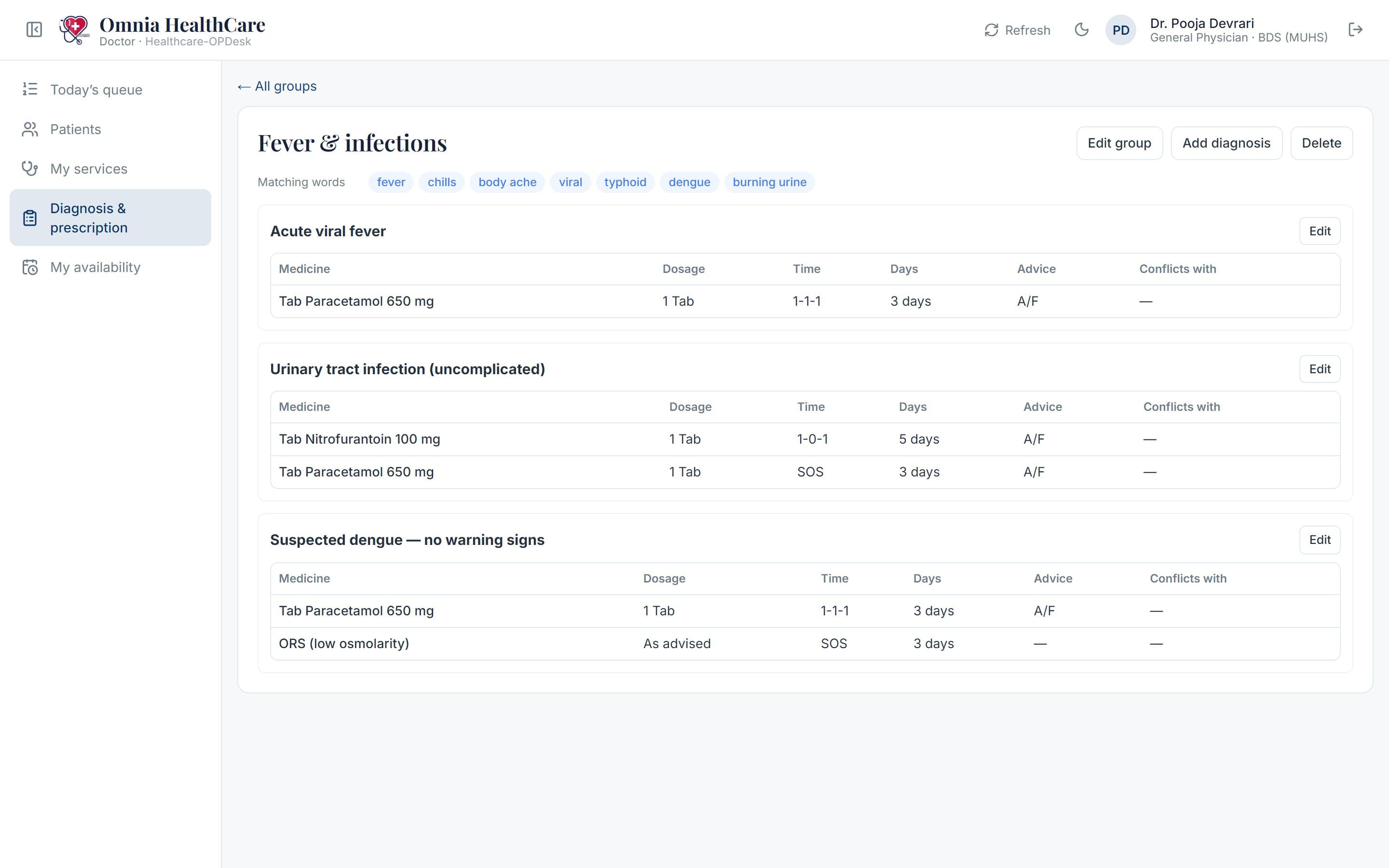
A diagnosis group: its diagnoses, each with the medicines, dose, timing and days it fills into the prescription

One product, many clinics

Every clinic gets its own Healthcare-OPDesk, from the same platform

Healthcare-OPDesk is one multi-tenant application. Each clinic’s address, branding, doctors, services and data load from its own settings, so a children’s clinic and a dental clinic each feel like their own software.

  1. 1

    Sign in, then register

    Sign in with Google; the first time, the clinic fills in Healthcare-OPDesk’s registration once.

  2. 2

    Its own address and brand

    Each clinic gets /opdesk/its-name, in its logo and colours.

  3. 3

    Admin invites the team

    Doctors and front desk get an email invite and sign in on the clinic’s own screen.

  4. 4

    Only that clinic's data

    Doctors, services, patients and bills stay separate.

Benefits

What changes in the clinic

Healthcare-OPDesk is built around what clinics struggle with most: a crowded counter, case papers left unwritten and billing at closing time.

  • Shorter waits at the counter

    Walk-ins get a token in seconds, and the waiting room sees whose turn is next.

  • Complete case papers

    Every visit is written up from the conversation, even on a busy day, without the doctor typing it all.

  • Safer prescriptions

    Allergy and history conflicts are flagged before the doctor signs.

  • Faster billing

    The invoice comes from the visit, and the dashboard shows what is still to collect.

  • Follow-ups don’t slip

    Every follow-up due is listed for the front desk to call.

  • Records you can trust

    Consent, signed visits that can’t be changed, and an audit trail of who did what.

Ready to modernize your clinic?

Sign in with your Google account, register your clinic in a few minutes, and get your own front desk and doctor apps — in your name and colours.

Contact

Talk to the Monkstack team

Tell us about your clinic and we will set up a demo with your own services, doctors and fees.

Office
Monkstack Technologies, Pune, India
Hours
Mon–Sat, 10am–7pm IST

Demo form. Nothing you type leaves this page.